VLANs in depth
VLAN design patterns, management and voice VLANs, port isolation, dynamic VLAN assignment, QinQ, and the attacks that target VLAN boundaries.
Switching and VLANs covers what a VLAN is and how access and trunk ports work. This page goes further into how VLANs are used on real networks and the mistakes that undo the isolation they are meant to provide.
#Designing a VLAN plan
A VLAN plan answers three questions for every device on the site: which VLAN is it in, what subnet does that VLAN use, and what is that VLAN allowed to reach. Two patterns cover nearly every deployment.
By function. One VLAN per kind of device. This is the normal pattern for an office, school, clinic, or warehouse.
| VLAN | Name | Subnet | Reaches |
|---|---|---|---|
| 10 | Management | 10.0.10.0/24 | Nothing initiates to it except admin workstations |
| 20 | Staff | 10.0.20.0/24 | Internet, servers, printers, cameras (view only) |
| 30 | Guest | 10.0.30.0/23 | Internet only, rate-limited |
| 40 | Cameras | 10.0.40.0/24 | The recorder only |
| 50 | Voice | 10.0.50.0/24 | The phone system and internet |
| 60 | IoT / building | 10.0.60.0/24 | Its controller only |
| 70 | Printers | 10.0.70.0/24 | Nothing; staff reach it |
By tenant. One VLAN per customer, unit, or room. This is the pattern for hotels, apartment buildings, student housing, and co-working spaces, and it is what ReadyLinks subscriber management automates. Each tenant VLAN gets its own small subnet, its own DHCP scope, its own bandwidth plan, and reaches only the internet. Tenants are invisible to each other even if they are on the same switch.
Guidelines that apply to both:
- Keep each broadcast domain to a few hundred hosts. A
/24is the sensible default. Go to/23for guest networks with heavy churn. Anything larger is a sign you need another VLAN, not a bigger one. - Make the VLAN ID and the subnet match (VLAN 20 ↔
10.0.20.0/24) so either one tells you the other. - Use the same IDs on every site. When VLAN 30 is always guest, templates, firewall rules, and troubleshooting instincts transfer between sites. See templates.
- Leave VLAN 1 empty. Move the management interface off it and never assign it to a port. It is the one VLAN every device, attacker, and default configuration assumes exists.
- Document reach, not just membership. A VLAN plan without the "reaches" column is only half a plan; the firewall rules follow from it.
#The management VLAN
Switches, access points, controllers, and the out-of-band interfaces of servers all have IP addresses of their own. Those addresses belong in a management VLAN that user traffic never touches.
- Give every switch its management address in this VLAN, either via DHCP reservation or a static address with DNS and NTP set.
- Carry the management VLAN tagged on every trunk, so every switch is reachable from the core.
- Never configure it as the untagged VLAN on an access port.
- Restrict access to it with an ACL or firewall rule to admin workstations and the jump host. Management protocols (SSH, HTTPS) should not be reachable from guest or tenant VLANs under any circumstances.
ReadyLinks switches reach the cloud outbound from their management address, so the management VLAN also needs the outbound rules in firewall rules.
GL-24xT-P600D# configure terminal
GL-24xT-P600D(config)# vlan 10
GL-24xT-P600D(vlan10)# name Management
GL-24xT-P600D(vlan10)# switchport tagged ethernet Fiber/G1
GL-24xT-P600D(vlan10)# end
GL-24xT-P600D(config)# interface vlan 10
GL-24xT-P600D(vlan-interface10)# ip address 10.0.10.5 255.255.255.0 10.0.10.1
GL-24xT-P600D(vlan-interface10)# end
GL-24xT-P600D(config)# write
The management VLAN is tagged on the uplink only. No access port is untagged in it. See IP addressing for the DNS and SNTP lines that go with a static management address, and management mode for the dashboard setting.
#Voice VLAN
Desk phones usually have a built-in two-port switch, and the PC sits behind the phone on a single wall socket. The standard arrangement is a voice VLAN: the port's untagged VLAN is the data VLAN for the PC, and the voice VLAN is carried tagged on the same port for the phone.
The phone learns which VLAN to tag from LLDP-MED (or Cisco's CDP), which the switch advertises on the port. The phone then tags its own traffic with the voice VLAN and passes the PC's traffic through untagged. Voice frames can be marked for priority at the same time, so a large file download on the PC doesn't degrade the call.
Configure it once in a port profile and apply it to every desk port. See switchport.
A GL-series switch has no dedicated voice VLAN command. The arrangement is a hybrid port with the data VLAN untagged (and as PVID) and the voice VLAN tagged, with LLDP enabled so the phone can see the switch. Whether the phone takes the VLAN from LLDP-MED automatically depends on the phone; if it doesn't, set the voice VLAN on the phone itself.
GL-24xT-P600D# configure terminal
GL-24xT-P600D(config)# lldp
GL-24xT-P600D(config)# vlan 20
GL-24xT-P600D(vlan20)# switchport untagged ethernet RJ45/G1
GL-24xT-P600D(vlan20)# end
GL-24xT-P600D(config)# vlan 50
GL-24xT-P600D(vlan50)# switchport tagged ethernet RJ45/G1
GL-24xT-P600D(vlan50)# end
GL-24xT-P600D(config)# interface ethernet RJ45/G1
GL-24xT-P600D(RJ45/G1)# switchport link-type hybrid
GL-24xT-P600D(RJ45/G1)# switchport pvid 20
GL-24xT-P600D(RJ45/G1)# lldp admin-status rxtx
GL-24xT-P600D(RJ45/G1)# end
GL-24xT-P600D(config)# write#Port isolation and private VLANs
Sometimes devices must share one VLAN and one subnet but still be unable to talk to each other. Hotel rooms on the same floor, kiosks in a lobby, and IoT sensors that only ever talk to their controller are typical. Creating a VLAN per device is possible but heavy.
Port isolation (also called protected ports, or a private VLAN in its simplest form) marks a set of ports as isolated. Isolated ports can send to and receive from the uplink, but never to each other, even though they are in the same VLAN. ARP between two isolated ports is blocked, so they can't even find each other.
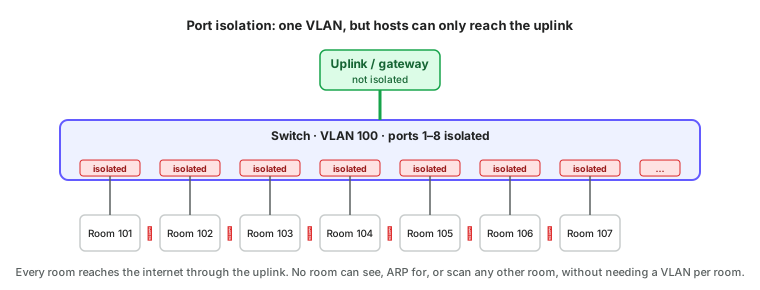
ReadyLinks switches enable isolation on LAN-facing ports by default and leave WAN-facing ports unisolated; see port isolation. Two cautions:
- Isolation is per switch. Two isolated ports on different switches can still reach each other through the uplinks unless the upstream switch isolates its downlinks too, or a VLAN per tenant is used.
- Anything that legitimately needs peer-to-peer traffic within the VLAN, such as AirPlay from a phone to a room TV, will be blocked. Put the TV and the phone in the same room's isolated group or use a VLAN per room instead.
Full private VLANs extend the idea with three port roles: promiscuous (the uplink, reaches everything), isolated (reaches only promiscuous ports), and community (reaches promiscuous ports and other ports in the same community). Community ports are what you'd use for a hotel suite with several sockets.
On a GL-series switch, port isolation is the switchport protected setting in interface mode. Protected ports can reach unprotected ports (the uplink) but not each other. The PROTECTED column of show interface status shows which ports have it.
GL-24xT-P600D# configure terminal
GL-24xT-P600D(config)# interface ethernet RJ45/G1
GL-24xT-P600D(RJ45/G1)# switchport protected
GL-24xT-P600D(RJ45/G1)# end
GL-24xT-P600D(config)# interface ethernet Fiber/G1
GL-24xT-P600D(Fiber/G1)# no switchport protected
GL-24xT-P600D(Fiber/G1)# end
GL-24xT-P600D(config)# write
GL-24xT-P600D(config)# exit
GL-24xT-P600D# show interface status#Dynamic VLAN assignment
Static VLAN-per-port works when the device on a port never changes. In an office where laptops roam and contractors come and go, it is better to assign the VLAN based on who connects rather than where.
- 802.1X with RADIUS. The device authenticates (certificate or username) and the RADIUS server replies with the VLAN to place it in. A staff laptop lands in VLAN 20 at any desk; an unknown device lands in the guest VLAN or a quarantine VLAN.
- MAC authentication bypass (MAB). For devices that can't do 802.1X (printers, cameras, phones), the switch sends the MAC address to RADIUS and gets a VLAN back. Weaker, since MAC addresses can be cloned, but far better than a static port assignment that anyone can plug into.
- MAC-based VLAN on the switch itself, a local table of MAC-to-VLAN mappings, for small sites without RADIUS.
Dynamic assignment is covered in more detail under Layer 2 security.
#QinQ: VLANs inside VLANs
A single 802.1Q tag allows 4094 VLANs. A service provider carrying traffic for hundreds of customers, each of whom has their own VLANs, needs more, and also needs the customers' VLAN numbers not to collide. QinQ (802.1ad, or stacked VLANs) adds a second tag: an outer S-tag that identifies the customer, wrapped around the customer's own inner C-tag.
Inside the provider's network only the S-tag is examined, so each customer effectively gets a private 4094-VLAN space. At the customer edge the S-tag is removed and the customer's own tags are exposed. You will meet QinQ on carrier Ethernet hand-offs and in large multi-tenant buildings where each tenant manages their own VLANs. It needs to be enabled explicitly on the ports that carry it; a standard trunk will drop or mis-handle double-tagged frames.
#VLAN hopping and how to prevent it
VLAN separation is only as good as the configuration of the ports. Two well-known attacks let a device in one VLAN reach another.
Switch spoofing. Some switches negotiate trunking automatically (Cisco's DTP is the classic). A device that pretends to be a switch asks the port to become a trunk, is granted every VLAN, and can then tag frames for any of them. Prevention: never leave a port in an automatic trunking mode. Access ports are access ports, trunks are explicitly configured trunks, and nothing is "dynamic auto".
Double tagging. An attacker on the native VLAN of a trunk sends a frame with two tags: an outer tag matching the native VLAN and an inner tag for the target VLAN. The first switch strips the outer tag (because it's the native VLAN, which is sent untagged) and forwards the frame along the trunk with the inner tag now exposed. The next switch sees a frame tagged for the target VLAN and delivers it. It only works one way, so the attacker can inject but not receive, which is enough for some attacks. Prevention: use a dedicated, otherwise-unused VLAN as the native VLAN on every trunk, and never put an access port in it. Better still, tag the native VLAN too, which most switches support.
Other hygiene that closes the remaining gaps:
- Shut down unused ports or place them in a dead-end "parking" VLAN with no gateway.
- Prune trunks to carry only the VLANs each downstream switch actually needs. A guest-only closet switch has no reason to receive the management VLAN.
- Don't trust tags from endpoints. An access port should drop tagged frames from the device, not honour them.
- Disable protocols you don't use on access ports: trunk negotiation, VTP or equivalent VLAN propagation, and routing protocol adjacencies.
ReadyLinks switches have no automatic trunk negotiation, so switch spoofing isn't possible against them. The remaining hygiene on the CLI:
GL-24xT-P600D# configure terminal
GL-24xT-P600D(config)# interface ethernet RJ45/G1
GL-24xT-P600D(RJ45/G1)# switchport link-type access
GL-24xT-P600D(RJ45/G1)# switchport pvid 20
GL-24xT-P600D(RJ45/G1)# switchport ingress-filtering
GL-24xT-P600D(RJ45/G1)# end
GL-24xT-P600D(config)# interface ethernet RJ45/G24
GL-24xT-P600D(RJ45/G24)# description Unused
GL-24xT-P600D(RJ45/G24)# shutdown
GL-24xT-P600D(RJ45/G24)# end
GL-24xT-P600D(config)# interface ethernet Fiber/G1
GL-24xT-P600D(Fiber/G1)# switchport link-type trunk
GL-24xT-P600D(Fiber/G1)# switchport admit-frame only-tag
GL-24xT-P600D(Fiber/G1)# end
GL-24xT-P600D(config)# write
switchport ingress-filtering makes a port drop frames tagged for VLANs it isn't a member of. switchport admit-frame only-tag on a trunk drops untagged frames, which removes the native VLAN as an attack path entirely. Pruning is the absence of switchport link-type trunk permit vlan all: tag only the VLANs the far switch needs, from VLAN mode.
#VLAN sizing and limits
| Thing | Limit | In practice |
|---|---|---|
| VLAN IDs | 1–4094 | Hundreds per site is normal; thousands needs QinQ or a different design |
| Hosts per VLAN | Whatever the subnet allows | Keep to 200–500 for a healthy broadcast domain |
| VLANs on a trunk | All of them | Prune to what the far switch needs |
| MAC table | A few thousand to tens of thousands per switch | Rarely hit, except on a core with many flat tenant VLANs |
| Spanning tree instances | Varies | Many VLANs with per-VLAN spanning tree can load a small switch's CPU; MSTP groups them |
#Checklist
- VLAN 1 unused and no port untagged in it.
- Management VLAN separate, tagged on trunks, never untagged on an access port, reachable only from admin hosts.
- One VLAN per function or per tenant,
/24by default, ID matching the subnet, same scheme on every site. - Voice VLAN via LLDP-MED on desk ports rather than a separate socket per phone.
- Isolated ports or a VLAN per tenant wherever hosts must not see each other.
- No automatic trunk negotiation anywhere; native VLAN unused and tagged; unused ports shut.
- Trunks pruned to the VLANs each switch needs.
Next: Multicast covers the one kind of traffic that VLAN boundaries and switches handle differently from everything else.
Last updated October 5, 2026