Multicast
Unicast, broadcast, and multicast compared; multicast addresses; IGMP joins and queries; why IGMP snooping and a querier matter; and how to troubleshoot a stream that stops after a few minutes.
Most traffic is one device talking to one other device. Some traffic, such as IPTV, video walls, camera feeds, and device discovery, is one device talking to many at once. Multicast is the mechanism that makes that efficient, and it only behaves well when the switches understand it.
#Three ways to address a frame
| Delivery | Destination | Who receives it | Example |
|---|---|---|---|
| Unicast | One specific device | That device only | A web page, an SSH session |
| Broadcast | Everybody on the segment | Every device in the VLAN, whether it cares or not | ARP, DHCP Discover |
| Multicast | A group | Only devices that have joined the group, if the switch is doing its job | IPTV channel, AirPlay discovery, a camera feed to several recorders |
Without multicast, a video server streaming one channel to 50 TVs would have to send 50 copies. With multicast it sends one copy to the group address, and the network replicates it only where receivers exist. The source doesn't know or care how many receivers there are.
#Multicast addresses
IPv4 reserves 224.0.0.0/4 (224.0.0.0 to 239.255.255.255) for multicast groups. A group address is only ever a destination; nothing has a multicast address as its own IP. Ranges worth recognising:
| Range | Scope | Examples |
|---|---|---|
224.0.0.0/24 | Link-local: never forwarded by routers, always flooded by switches | 224.0.0.1 all hosts · 224.0.0.2 all routers · 224.0.0.251 mDNS (Bonjour, AirPlay, Chromecast) · 224.0.0.252 LLMNR |
239.0.0.0/8 | Organisation-local: for use inside a private network, like private IP ranges | IPTV channel line-ups, in-house video, camera streams |
232.0.0.0/8 | Source-specific multicast (SSM) | Receivers join a specific source and group pair |
| everything else | Globally scoped | Rare on enterprise networks |
Every multicast IP maps to a multicast MAC address so switches can handle it. IPv4 group addresses map into 01:00:5e:00:00:00 to 01:00:5e:7f:ff:ff by copying the low 23 bits of the IP address. Because the IP address has 28 significant bits and the MAC only has room for 23, 32 different groups share each MAC address. That is normally harmless, but it is why 239.1.1.1 and 239.129.1.1 arrive on the same ports if the switch is only looking at MAC addresses.
IPv6 uses ff00::/8 for multicast, with ff02::1 (all nodes) and ff02::fb (mDNS) being the ones you will meet most, and maps to MAC addresses beginning 33:33.
#IGMP: joining and leaving a group
A device that wants to receive a group says so with IGMP (Internet Group Management Protocol). A device that wants to stop says so too. Routers and switches listen to these messages to work out where a group should be sent.
| Message | Sent by | Meaning |
|---|---|---|
| Membership report (join) | A receiver | "Send me group 239.1.1.1." Sent when an application subscribes, and again in answer to every query. |
| Leave | A receiver | "I no longer want 239.1.1.1." |
| General query | The querier | "Who still wants anything?" sent to all hosts every 60 to 125 seconds. Receivers answer with reports for every group they are in. |
| Group-specific query | The querier | "Does anyone else still want 239.1.1.1?" sent after a leave, to check whether the last receiver on a port has gone. |
IGMP version 2 is the one in near-universal use. Version 3 adds source filtering, so a receiver can ask for a group only from a particular source, which is what SSM relies on. IPv6 uses MLD (Multicast Listener Discovery), which works the same way.
#IGMP snooping: making the switch pay attention
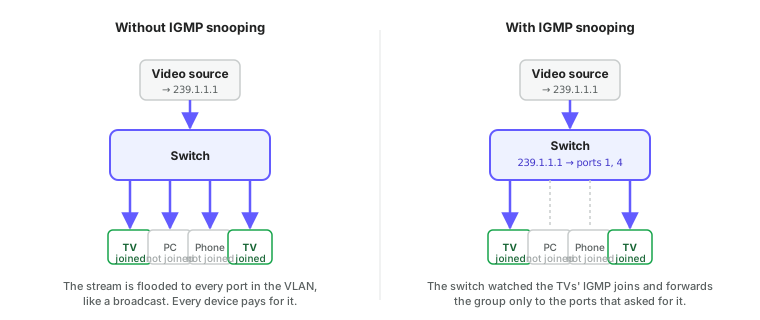
A switch on its own treats a multicast frame like a broadcast: the destination MAC isn't in its MAC table, so it floods the frame to every port in the VLAN. On a network with any real multicast traffic that is a problem. A single 20 Mbit/s IPTV channel floods every port, every access point, and every phone in the VLAN, whether they wanted it or not. Wi-Fi suffers worst, because multicast over the air is sent at the lowest supported rate.
IGMP snooping fixes it. The switch watches the IGMP reports and leaves passing through it and builds a table of which groups are wanted on which ports. It then forwards each group only to those ports, plus any port that leads to a multicast router.
Settings that go with it, all found under multicast settings on a ReadyLinks switch:
- Fast leave (immediate leave) removes a port from a group as soon as a Leave arrives, instead of sending a group-specific query and waiting. It suits ports with exactly one receiver (a TV, a set-top box). On ports with several receivers behind them (a downstream switch, an access point) one device leaving will cut off the others for a few seconds. On GL-series switches fast leave is a single global setting, so enable it only when every port carrying multicast has one receiver.
- Host timeout (group membership interval) is how long a port stays in a group without hearing a report. If it is shorter than the query interval, memberships expire between queries and streams stutter.
- Multicast router ports are the ports the switch has heard queries on. Groups are always forwarded there, so that routers and upstream snooping switches see every stream.
#IGMP snooping on a ReadyLinks switch
Snooping, the querier, timers and fast leave are global settings in config mode. The IGMP version and a static multicast router port are set per VLAN.
GL-24xT-P600D# configure terminal
GL-24xT-P600D(config)# ip igmp snooping
GL-24xT-P600D(config)# ip igmp snooping querier
GL-24xT-P600D(config)# ip igmp snooping query-interval 125
GL-24xT-P600D(config)# ip igmp snooping host-aging-time 260
GL-24xT-P600D(config)# ip igmp snooping router-aging-time 260
GL-24xT-P600D(config)# ip igmp snooping immediate-leave
GL-24xT-P600D(config)# vlan 20
GL-24xT-P600D(vlan20)# ip igmp snooping version v2
GL-24xT-P600D(vlan20)# multicast static-router-port ethernet Fiber/G1
GL-24xT-P600D(vlan20)# end
GL-24xT-P600D(config)# write
GL-24xT-P600D(config)# exit
GL-24xT-P600D# show ip igmp snooping configuration
GL-24xT-P600D# show ip igmp snooping group
GL-24xT-P600D# show ip igmp snooping vlan 20
Keep the host aging time (20 to 1000 seconds) comfortably longer than twice the query interval (1 to 255 seconds), so a missed query doesn't expire a membership. The static router port is only needed when the upstream switch or router doesn't send queries into this VLAN. The dashboard equivalents are under multicast settings.
#The querier problem
IGMP snooping only works while something is sending queries. Receivers answer queries with reports, and reports are what keep the snooping table alive. On a VLAN with a multicast-capable router, the router is the querier. On a VLAN with no such router, which describes most access VLANs, nothing sends queries. The snooping table fills from the initial joins, then entries expire after the host timeout and the stream stops.
The symptom is unmistakable: a multicast stream works for two to five minutes after a device joins, then dies, and comes back when the device re-joins.
The fix is to enable the switch's built-in IGMP querier on every VLAN that carries multicast and has no multicast router. Exactly one querier is needed per VLAN; if several switches have the querier enabled, IGMP elects the one with the lowest IP address and the rest stand by, so enabling it on every switch is safe.
#Unknown multicast and link-local groups
Two cases bypass the snooping table on purpose:
- Link-local groups (
224.0.0.0/24) are flooded to every port regardless of snooping, because protocols such as OSPF, VRRP, and mDNS rely on it and never send IGMP joins. - Unknown multicast, meaning groups no port has joined, is by default flooded like a broadcast. Some switches offer a setting to drop it instead. Dropping it is tidier but breaks any application that sends to a group without expecting receivers to join first.
mDNS deserves a special mention because it is how AirPlay, Chromecast, printers, and most smart-home devices find each other. It is link-local multicast, so it never crosses a router. A phone in the guest VLAN can't discover a TV in the staff VLAN, no matter what firewall rules exist. Sites that need discovery across VLANs run an mDNS reflector or gateway on the router that repeats the announcements between selected VLANs.
#Multicast across VLANs
Snooping is a Layer 2 feature. Getting a group from the VLAN where the source lives to receivers in another VLAN requires multicast routing, which is a separate feature with its own protocol, PIM (Protocol Independent Multicast). Many access switches and small firewalls don't support it.
The practical consequence: keep multicast sources and receivers in the same VLAN wherever possible. For an IPTV deployment that means a dedicated video VLAN that set-top boxes are placed in, rather than relying on routing the streams. Where streams genuinely must cross VLANs, confirm the gateway device supports PIM or an equivalent before designing around it.
#Where you meet multicast
| Application | Group range | What to configure |
|---|---|---|
| IPTV, hospitality TV, digital signage | 239.x.x.x | Snooping on, querier on in the video VLAN, fast leave on set-top box ports |
| Video walls, in-house broadcast | 239.x.x.x | As above |
| IP cameras to several recorders | 239.x.x.x or unicast | Snooping and querier if multicast is used; most small deployments use unicast |
| AirPlay, Chromecast, printers (mDNS) | 224.0.0.251 | Nothing on the switch; an mDNS gateway on the router if discovery must cross VLANs |
| Routing protocols, VRRP, HSRP | 224.0.0.x | Nothing; always flooded |
| Windows discovery (LLMNR, SSDP) | 224.0.0.252, 239.255.255.250 | Nothing, but consider blocking SSDP from guest VLANs |
#Troubleshooting multicast
| Symptom | Likely cause |
|---|---|
| Stream works for a few minutes then stops | No querier in the VLAN. Enable the switch querier. |
| Stream works on wired devices, but Wi-Fi is slow for everyone | Snooping is off and the stream is being flooded to the access points. Enable snooping. |
| Stream never arrives, but unicast to the same server works | Source and receiver are in different VLANs with no multicast routing; or the switch is dropping unknown multicast and the receiver's join isn't reaching the switch. |
| One TV changing channel interrupts another | Fast leave is enabled on a port that has more than one receiver behind it. |
| Everything works until a second switch is added | The new switch has no querier and no multicast router port toward the first switch; or snooping is on in one and off in the other. |
| AirPlay or Chromecast can't find devices | They are in different VLANs. mDNS doesn't route; use an mDNS gateway. |
show ip igmp snooping group on the switch lists each group, the VLAN, and the ports it is being forwarded to, which is the quickest way to confirm whether a join was heard.
Next: Layer 2 security covers DHCP snooping, ARP inspection, and the other features that protect the VLANs you have built.
Last updated October 5, 2026