IP addressing
IPv4 addresses, subnet masks, CIDR notation, default gateways, DHCP, DNS, and NAT, with worked examples you can apply to a real site.
Nearly every configuration field in ReadyView that isn't a VLAN ID is an IP address, a subnet mask, or a range of addresses. This page explains what those fields mean and how to pick sensible values.
#Anatomy of an IPv4 address
An IPv4 address is a 32-bit number, written as four decimal numbers from 0 to 255 separated by dots: 192.168.10.42. Each of the four parts is called an octet.
The address is split into two parts:
- The network portion identifies which network the device is on. Every device on the same network shares it.
- The host portion identifies the specific device within that network.
Where the split falls is defined by the subnet mask.
#Subnet masks and CIDR
A subnet mask is also 32 bits. Every bit that is 1 in the mask belongs to the network portion; every 0 bit belongs to the host portion. Masks are written either in dotted form (255.255.255.0) or, far more commonly, as a prefix length after a slash (/24), which just counts the 1 bits. This slash form is called CIDR notation.
| CIDR | Dotted mask | Usable host addresses | Typical use |
|---|---|---|---|
/30 | 255.255.255.252 | 2 | Point-to-point links between routers |
/29 | 255.255.255.248 | 6 | Tiny management segments |
/28 | 255.255.255.240 | 14 | Small device groups |
/27 | 255.255.255.224 | 30 | Small office |
/26 | 255.255.255.192 | 62 | Floor of a building |
/25 | 255.255.255.128 | 126 | Medium office |
/24 | 255.255.255.0 | 254 | The default for most VLANs |
/23 | 255.255.254.0 | 510 | Large VLANs, guest networks |
/22 | 255.255.252.0 | 1,022 | Very large flat networks (usually a sign you need more VLANs) |
/16 | 255.255.0.0 | 65,534 | Summaries, not individual VLANs |
"Usable" is two less than the arithmetic total because the first address in any subnet (all host bits zero) is the network address and the last (all host bits one) is the broadcast address. Neither can be assigned to a device.
#A worked example
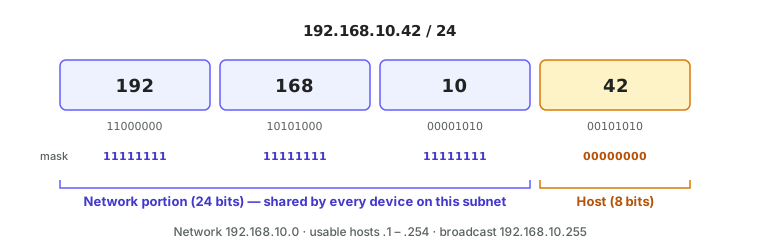
Take 192.168.10.42/24.
- The mask is
/24, so the first 24 bits (three octets) are the network:192.168.10. - The last octet is the host:
42. - The network address is
192.168.10.0. - The broadcast address is
192.168.10.255. - Usable addresses run from
192.168.10.1to192.168.10.254.
Any other device with an address from 192.168.10.1 to 192.168.10.254 and the same /24 mask is on the same network and can talk to this one directly. A device at 192.168.11.5/24 is on a different network and needs a router in between, even if it is plugged into the next port on the same switch.
#When the split isn't on an octet boundary
A /26 splits the last octet into four blocks of 64:
| Subnet | Network | First usable | Last usable | Broadcast |
|---|---|---|---|---|
192.168.10.0/26 | .0 | .1 | .62 | .63 |
192.168.10.64/26 | .64 | .65 | .126 | .127 |
192.168.10.128/26 | .128 | .129 | .190 | .191 |
192.168.10.192/26 | .192 | .193 | .254 | .255 |
The block size is always 256 − (last mask octet), so for 255.255.255.192 it is 256 − 192 = 64.
#Private address ranges
Three blocks are reserved for use inside private networks. They are never routed on the public internet, so any site can use them without coordinating with anyone.
| Block | Range | Addresses | Common use |
|---|---|---|---|
10.0.0.0/8 | 10.0.0.0 – 10.255.255.255 | 16.7 million | Large organisations, anything that needs room to grow |
172.16.0.0/12 | 172.16.0.0 – 172.31.255.255 | 1 million | Medium sites; often used to avoid clashing with home networks on VPNs |
192.168.0.0/16 | 192.168.0.0 – 192.168.255.255 | 65,536 | Small sites and home routers |
Pick one block per site and carve VLANs out of it in a pattern that makes the VLAN obvious from the address. A common scheme is to make the third octet match the VLAN ID:
| VLAN | Purpose | Subnet |
|---|---|---|
| 10 | Management | 10.0.10.0/24 |
| 20 | Staff | 10.0.20.0/24 |
| 30 | Guest | 10.0.30.0/23 |
| 40 | Cameras | 10.0.40.0/24 |
| 50 | Voice | 10.0.50.0/24 |
Two other ranges are worth recognising:
169.254.0.0/16is link-local. A device assigns itself an address from this range when it asked for DHCP and nobody answered. Seeing169.254.x.xon a device almost always means "DHCP is not reaching this port".127.0.0.0/8is loopback.127.0.0.1always means "this device".
#Default gateway
A device can only send frames directly to other devices on its own subnet. For anything else it sends the packet to its default gateway, which is the IP address of a router on the local subnet.
By convention the gateway is the first usable address in the subnet (192.168.10.1), though some sites use the last (.254). What matters is consistency and that the gateway address is actually configured on a router interface in that VLAN.
On a ReadyLinks network the gateway for a VLAN is usually the Layer 3 interface on the GLx switch, configured in the VLAN's settings, or the upstream firewall if the switch is operating purely at Layer 2.
#DHCP: handing out addresses automatically
Configuring an address, mask, gateway, and DNS servers on every device by hand doesn't scale. DHCP (Dynamic Host Configuration Protocol) automates it.
When a device connects it broadcasts a request for an address. A DHCP server on the same broadcast domain answers with a lease: an address, the subnet mask, the default gateway, DNS server addresses, and a lease time after which the device must renew. The exchange has four steps, often remembered as DORA:
- Discover — the client broadcasts "is there a DHCP server?"
- Offer — a server replies with a proposed address.
- Request — the client broadcasts "I'd like that one, please."
- Acknowledge — the server confirms and the lease starts.
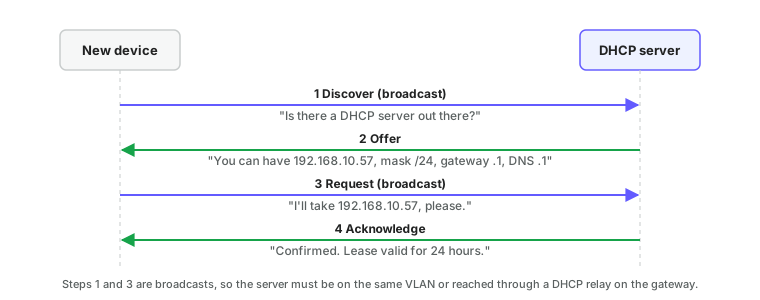
Because the Discover is a broadcast, the DHCP server must be either on the same VLAN as the client or reachable through a DHCP relay (sometimes called an IP helper) configured on the VLAN's gateway. The relay forwards the broadcast as a unicast to a server on another network and passes the answer back.
A DHCP scope (or pool) is the range of addresses a server is allowed to hand out on a given subnet. Leave room outside the scope for devices with fixed addresses:
| Range | Use |
|---|---|
.1 | Gateway |
.2 – .19 | Switches, access points, printers, other infrastructure with static addresses |
.20 – .199 | DHCP scope for ordinary clients |
.200 – .254 | Reserved for future static assignments |
A DHCP reservation gives a specific MAC address the same IP every time without configuring the device itself. Use reservations rather than static addresses wherever possible: the configuration lives in one place and the device still gets its gateway and DNS settings automatically.
The built-in DHCP server on a GL-series switch serves one pool on one VLAN. From the CLI:
GL-24xT-P600D# configure terminal
GL-24xT-P600D(config)# ip dhcp server vlan 20
GL-24xT-P600D(config)# ip dhcp server start-ip 10.0.20.20 end-ip 10.0.20.199 netmask 255.255.255.0 gateway 10.0.20.1
GL-24xT-P600D(config)# ip dhcp server dns 8.8.8.8
GL-24xT-P600D(config)# ip dhcp server lease day 1
GL-24xT-P600D(config)# ip dhcp server
GL-24xT-P600D(config)# write
GL-24xT-P600D(config)# exit
GL-24xT-P600D# show ip dhcp server
The last ip dhcp server line turns the service on; set the pool first so it never hands out an empty scope. show ip dhcp server lists the pool settings and current leases. See DHCP server for the dashboard equivalent.
#DNS: turning names into addresses
People use names like readylinks.io; packets need numbers like 104.21.8.17. DNS (Domain Name System) translates between them.
A device sends its query to the DNS server it learned from DHCP. If that server doesn't know the answer it asks a chain of other servers, starting at the root, until it finds the one responsible for the name, and then caches the result for a period the domain owner sets (the TTL).
Common record types:
| Type | Maps | Example |
|---|---|---|
A | Name → IPv4 address | readylinks.io → 104.21.8.17 |
AAAA | Name → IPv6 address | readylinks.io → 2606:4700:… |
CNAME | Name → another name | www.readylinks.io → readylinks.io |
MX | Domain → mail server | readylinks.io → mail.readylinks.io |
PTR | IP address → name (reverse lookup) | 17.8.21.104.in-addr.arpa → readylinks.io |
DNS is the most common reason "the internet is down" when it isn't. A device with a working address and gateway but no DNS can ping 8.8.8.8 but not open any website. Public resolvers such as 8.8.8.8, 8.8.4.4 (Google) and 1.1.1.1 (Cloudflare) are a reliable fallback when you aren't sure what the local DNS server should be.
ReadyLinks switches themselves need working DNS to find the cloud: see firewall rules.
#NAT: many private addresses, one public address
Private addresses can't be used on the internet, yet every device on a private network can browse the web. NAT (Network Address Translation) makes that work.
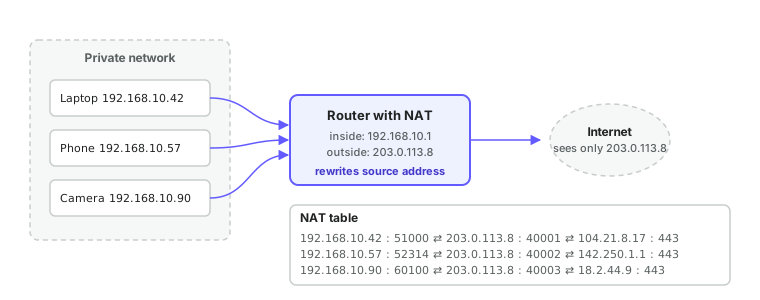
The site router has one public address on its internet-facing interface. As each outbound packet passes through, the router rewrites the private source address to its own public address, picks a unique source port, and records the mapping in a table. When the reply comes back addressed to that public address and port, the router looks up the mapping, rewrites the destination back to the original private address, and forwards it inside.
Consequences worth knowing:
- Devices on the internet can't initiate connections to a private address. That is a feature for security and a nuisance for hosting anything. Port forwarding is a manually configured NAT entry that sends inbound traffic on a chosen port to a chosen internal device.
- Everything behind a NAT router appears to the internet as a single address. This is why a cloud service sees "one customer at one IP" even though there are 300 devices on site.
- Cloud-managed devices like ReadyLinks switches always initiate connections outbound to the cloud, precisely so that they work behind NAT without any port forwarding. See firewall rules.
#Static vs dynamic addressing
| Static | DHCP | |
|---|---|---|
| Configured on | The device itself | The DHCP server |
| Survives a DHCP outage | Yes | Until the lease expires |
| Easy to change later | No, visit every device | Yes, edit the server |
| Risk of duplicates | High if not tracked carefully | Low; the server owns the pool |
| Best for | Gateways, DHCP servers, DNS servers, anything DHCP depends on | Everything else, with reservations for infrastructure |
ReadyLinks switches can take either. When using a static address on a switch, remember that DNS and NTP servers must also be set manually; a static address without DNS can't reach the cloud. See switch settings.
A switch's own address lives on a VLAN interface. The third argument of ip address is the default gateway. DNS and SNTP are global settings, and every SNTP argument is required.
GL-24xT-P600D# configure terminal
GL-24xT-P600D(config)# interface vlan 10
GL-24xT-P600D(vlan-interface10)# ip address 10.0.10.5 255.255.255.0 10.0.10.1
GL-24xT-P600D(vlan-interface10)# end
GL-24xT-P600D(config)# dns nameserver1 8.8.8.8 nameserver2 8.8.4.4
GL-24xT-P600D(config)# sntp client server-ip 10.0.10.1 response-time 10 zone-offset GMT-5 time-offset 0
GL-24xT-P600D(config)# write
GL-24xT-P600D(config)# exit
GL-24xT-P600D# show vlan interface
GL-24xT-P600D# show dns
GL-24xT-P600D# show sntp
To let the switch take its address from DHCP instead, use ip address dhcp on the VLAN interface. sntp client server-address <hostname> accepts a name in place of an IP.
#A note on IPv6
IPv6 addresses are 128 bits, written in hexadecimal groups separated by colons: 2001:db8:10::42. The ideas on this page carry over directly: the prefix length still separates network from host (a /64 per VLAN is standard), the default gateway still routes between subnets, and DNS still maps names to addresses. The main differences are that there are so many addresses that NAT is unnecessary, devices can configure their own addresses from a router advertisement without DHCP, and ARP is replaced by Neighbour Discovery. Most sites today run IPv4 internally, with IPv6 arriving first on internet-facing links.
Next: Switching and VLANs covers how to split one physical switch into the separate networks these addresses describe.
Last updated October 5, 2026