Layer 2 security
The attacks that work from inside a VLAN, and the switch features that stop them: DHCP snooping, dynamic ARP inspection, IP source guard, port security, storm control, loop and BPDU protection, 802.1X, and port isolation.
Firewalls protect the edge of a network. Inside a VLAN, where devices talk to each other through a switch without any firewall in the path, a different set of protections applies. These are Layer 2 security features, and they all run on the switch itself.
#The threat model
Anyone with a cable and a seat near a wall socket is on the inside of your network. That includes guests, contractors, tenants, a compromised laptop, or a cheap router someone brought from home to get Wi-Fi at their desk. From inside a VLAN, without any special skill, such a device can:
| Attack | How | Result |
|---|---|---|
| Rogue DHCP | Answer DHCP requests faster than the real server | Victims get a wrong gateway or DNS server and all their traffic goes through the attacker |
| ARP spoofing | Claim to own the gateway's IP address | Victims send everything to the attacker, who forwards it on and reads it in between (man-in-the-middle) |
| IP spoofing | Send packets from an address that isn't theirs | Bypass address-based rules; hide the source of an attack |
| MAC flooding | Send frames from thousands of fake MAC addresses | Fill the switch's MAC table so it floods all traffic to every port, which the attacker can then capture |
| Broadcast storm | Loop a cable, or just send broadcasts as fast as possible | Take the whole VLAN down |
| Rogue switch | Plug in an unmanaged switch, or a device claiming to be a switch | Create loops, hijack spanning tree, or negotiate a trunk and reach every VLAN |
| Unauthorised access | Plug into any live socket | Join the VLAN that socket is in |
Each row has a specific switch feature that defeats it. They are listed below in the order you should enable them, because several depend on the ones before.
#DHCP snooping
DHCP snooping stops rogue DHCP servers and builds the table that most other features rely on.
Every port is marked trusted or untrusted. Trusted ports are the ones that lead to the legitimate DHCP server: the uplink, trunks to other switches, and the port to the server itself if it is directly attached. Everything else, meaning every port a user device could be plugged into, is untrusted.
The switch then applies two rules:
- DHCP server messages (Offer, Ack, Nak) arriving on an untrusted port are dropped. A rogue DHCP server on an access port can answer all it likes; nobody hears it.
- DHCP client messages (Discover, Request) are allowed from any port, and when the switch sees the server's Ack go back to a client, it records the result in the DHCP snooping binding table: MAC address, IP address, VLAN, port, and lease time.
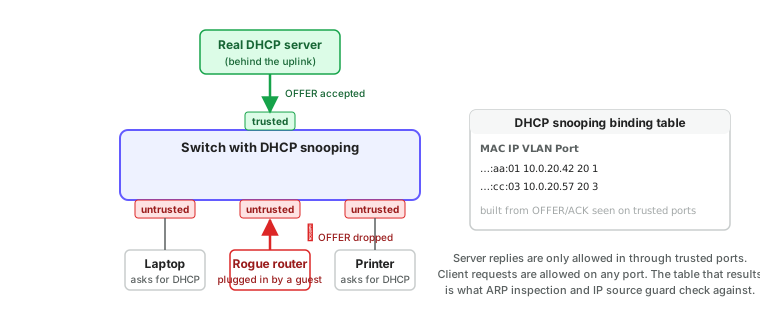
The binding table is the switch's knowledge of which IP address legitimately belongs to which MAC on which port. Dynamic ARP inspection and IP source guard are only lookups against it.
Related settings on ReadyLinks switches, under DHCP snooping and the per-port DHCP trust and DHCP rate limit:
- Rate limiting caps DHCP messages per second on untrusted ports, so a device can't exhaust the real server's pool by requesting thousands of leases. A handful per second is plenty for a single device; a port with a downstream switch behind it needs more.
- Protective down shuts a port that exceeds the limit, and recover brings it back after a timer, so a misbehaving device is contained without a truck roll.
- Option 82 inserts the switch and port identity into relayed DHCP requests so the server knows physically where a request came from. Used by service providers to tie a lease to a subscriber port.
#DHCP snooping on a ReadyLinks switch
Snooping, trust and the recovery timer are set in config mode. Note that trust is set from config mode with the port named in the command, not from interface mode. Rate limits are per port in interface mode.
GL-24xT-P600D# configure terminal
GL-24xT-P600D(config)# ip dhcp snooping
GL-24xT-P600D(config)# ip dhcp snooping interface ethernet Fiber/G1 trust
GL-24xT-P600D(config)# ip dhcp snooping interface ethernet Fiber/G2 trust
GL-24xT-P600D(config)# ip dhcp protective-down recover interval 300
GL-24xT-P600D(config)# interface ethernet RJ45/G1
GL-24xT-P600D(RJ45/G1)# ip dhcp rate-limit
GL-24xT-P600D(RJ45/G1)# ip dhcp rate-limit rate 15
GL-24xT-P600D(RJ45/G1)# end
GL-24xT-P600D(config)# write
GL-24xT-P600D(config)# exit
GL-24xT-P600D# show ip dhcp snooping status
GL-24xT-P600D# show ip dhcp snooping group
GL-24xT-P600D# show ip dhcp rate-limit
show ip dhcp snooping status lists every port's trust state; show ip dhcp snooping group is the binding table. The rate limit range is 10 to 150 packets per second. Option 82 is ip dhcp snooping information option. To remove trust: no ip dhcp snooping ethernet Fiber/G1 trust in config mode.
#Dynamic ARP inspection
ARP has no authentication. Any device can broadcast "10.0.20.1 is at my MAC" and every device on the VLAN will believe it and update its ARP table. That is ARP spoofing (or ARP poisoning), and it is the standard way to intercept traffic inside a VLAN.
Dynamic ARP inspection (DAI) checks every ARP packet arriving on an untrusted port against the DHCP snooping binding table. If the sender's IP and MAC in the ARP packet don't match a binding for that port, the packet is dropped and the event is logged. ARP from trusted ports (uplinks, where the gateway's real ARP replies come from) is not inspected.
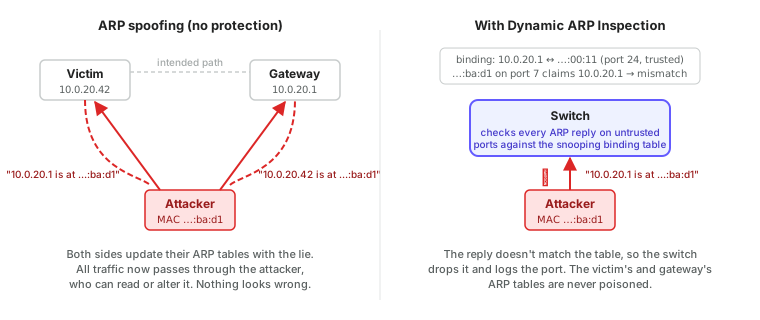
Things to get right, configured under dynamic ARP inspection and the per-port ARP trust and ARP rate limit:
- DHCP snooping must be on first, and must have been on long enough for the binding table to be populated. Enabling DAI on a switch with an empty binding table drops every ARP packet from every client.
- Devices with static IP addresses have no DHCP binding, so DAI blocks their ARP. Either add static bindings for them (an "ARP ACL" or static snooping entry) or, better, convert them to DHCP reservations.
- Trust the same ports as DHCP snooping. The gateway's ARP replies come in through the uplink; if the uplink is untrusted for ARP, nothing can reach the gateway.
- Rate limit ARP on untrusted ports. A device sending hundreds of ARP packets per second is scanning or attacking, and the port can be shut down automatically with the same protective-down and recover mechanism as DHCP.
#ARP inspection on a ReadyLinks switch
ARP inspection is enabled per VLAN from inside VLAN mode. There is no global switch. Trust and rate limits are per port in interface mode.
GL-24xT-P600D# configure terminal
GL-24xT-P600D(config)# vlan 20
GL-24xT-P600D(vlan20)# arp-inspection
GL-24xT-P600D(vlan20)# end
GL-24xT-P600D(config)# interface ethernet Fiber/G1
GL-24xT-P600D(Fiber/G1)# arp-inspection trust
GL-24xT-P600D(Fiber/G1)# end
GL-24xT-P600D(config)# interface ethernet RJ45/G1
GL-24xT-P600D(RJ45/G1)# arp rate-limit
GL-24xT-P600D(RJ45/G1)# arp rate-limit rate 100
GL-24xT-P600D(RJ45/G1)# end
GL-24xT-P600D(config)# arp protective-down recover interval 300
GL-24xT-P600D(config)# write
GL-24xT-P600D(config)# exit
GL-24xT-P600D# show arp-inspection status
GL-24xT-P600D# show arp-inspection statistic
GL-24xT-P600D# show arp rate-limit
The ARP rate limit range is 10 to 1024 packets per second. arp-inspection restrict-forward in VLAN mode additionally drops ARP packets whose Ethernet source MAC doesn't match the MAC inside the ARP payload. Static entries for devices that don't use DHCP are added through the IP binding table described under IP source guard.
#IP source guard
With the binding table in place, the switch can go one step further and check the source IP address of every ordinary packet from an untrusted port. IP source guard drops packets whose source IP and MAC don't match that port's binding, which stops a device from spoofing another device's address or sending from an address it was never leased.
It has the same prerequisites and the same static-address caveat as DAI. It is most valuable on tenant and guest VLANs, where it guarantees that logs and rate limits attributed to an address really do belong to the device that holds the lease.
On a GL-series switch the feature is called IP check source and is enabled per port. Static bindings for devices with fixed addresses go into the IP binding table, which both this feature and ARP inspection consult.
GL-24xT-P600D# configure terminal
GL-24xT-P600D(config)# interface ethernet RJ45/G1
GL-24xT-P600D(RJ45/G1)# ip-check-source
GL-24xT-P600D(RJ45/G1)# end
GL-24xT-P600D(config)# ip ip-binding
GL-24xT-P600D(ip-binding)# user-bind mac-addr 0013.ba0a.99e2 ip-addr 10.0.20.50 ethernet RJ45/G5
GL-24xT-P600D(ip-binding)# end
GL-24xT-P600D(config)# write
GL-24xT-P600D(config)# exit
GL-24xT-P600D# show ip-check-source status
GL-24xT-P600D# show ip-binding#Port security and MAC limits
A switch's MAC table has finite room. If an attacker sends frames from thousands of random source MACs, the table fills, the switch can no longer learn, and it falls back to flooding every frame to every port, which turns it into a hub the attacker can sniff.
Port security, called max MAC learn on ReadyLinks switches, limits how many MAC addresses a port may learn. Set it to a small number on access ports: 1 for a single device, 2 or 3 for a phone with a PC behind it, and a higher number only on ports that lead to a downstream switch or access point. When the limit is exceeded, the port either drops the new addresses or shuts down.
Some switches also allow sticky MAC addresses, where the first MAC learned is written into the configuration and the port only ever accepts that device. Useful for cameras and kiosks that never change.
On a GL-series switch the limit is port-security maximum in interface mode, and the current value appears in the MAXLEARN column of show interface status. no learning stops a port learning any new addresses at all, which combined with static MAC entries gives the sticky behaviour.
GL-24xT-P600D# configure terminal
GL-24xT-P600D(config)# interface ethernet RJ45/G1
GL-24xT-P600D(RJ45/G1)# port-security maximum 2
GL-24xT-P600D(RJ45/G1)# end
GL-24xT-P600D(config)# write
GL-24xT-P600D(config)# exit
GL-24xT-P600D# show interface status
GL-24xT-P600D# show mac-address interface ethernet RJ45/G1#Storm control and rate limiting
A broadcast storm is the single fastest way to take down a VLAN. Causes range from a looped cable to a faulty network card to a deliberate flood. Storm control sets a ceiling on broadcast, multicast, and unknown-unicast frames per port, measured in packets per second or as a percentage of link speed. Above the ceiling the switch drops the excess, so one port's storm can't consume the whole switch.
A general per-port rate limit caps all traffic on a port, which is how tenant bandwidth plans are enforced. See subscriber management for how that is applied automatically.
On the CLI, storm control takes a type number and a packets-per-second ceiling. Type 1 is broadcast, 2 multicast, 3 unknown unicast (DLF), and 4 to 7 are the combinations (7 is all three). In interface mode the type keyword is omitted; in config mode, where it sets a switch-wide default, it is required. Per-port bandwidth caps are line-rate.
GL-24xT-P600D# configure terminal
GL-24xT-P600D(config)# storm-control type 7 level pps 2000
GL-24xT-P600D(config)# interface ethernet RJ45/G1
GL-24xT-P600D(RJ45/G1)# storm-control 1 level pps 500
GL-24xT-P600D(RJ45/G1)# line-rate ingress rate 100m
GL-24xT-P600D(RJ45/G1)# line-rate egress rate 100m
GL-24xT-P600D(RJ45/G1)# end
GL-24xT-P600D(config)# write
GL-24xT-P600D(config)# exit
GL-24xT-P600D# show storm-control
GL-24xT-P600D# show interface status
INGRESS and EGRESS in show interface status show the line-rate caps. Remove them with no line-rate ingress and no line-rate egress; no storm-control clears the storm threshold.
#Loop protection and BPDU guard
Spanning tree prevents loops between managed switches that all run it. Two things get past it: unmanaged switches that don't run STP, and someone plugging both ends of a patch lead into the same switch.
- Loop detection sends a probe frame out each port and raises an alert, or shuts the port, if the probe comes back in on any port of the same switch. It catches loops that STP can't see. On ReadyLinks switches each port can be set to detect only (alert and keep the port up) or to detect and shut the port; see loop detection. The loop detected alert tells you which port.
- BPDU guard shuts an access port down the moment a spanning-tree BPDU arrives on it. Only switches send BPDUs, so a BPDU on an access port means someone plugged in a switch, or is pretending to be one. This closes the switch-spoofing route into other VLANs described in VLANs in depth.
- Root guard goes on the ports facing downstream switches and refuses to let any of them become the spanning-tree root, so a rogue or misconfigured switch can't re-shape the topology.
#Loop protection on a ReadyLinks switch
Loop detection has three parts: a global enable, a per-port enable, and a per-port action. The per-port enable on its own is detect mode: the switch sends probes on the port, logs a loop when a probe comes back, raises the alert in ReadyView, and leaves the port up. Adding loop-detection control makes it control mode: the port is shut down as well. There is no separate detect keyword; a port with loop-detection and without loop-detection control is in detect mode.
Use detect mode first on a site you don't know, so a false positive (a probe echoed by a cheap unmanaged switch, or a hub-like media converter) only generates alerts. Switch to control mode on access ports once you trust the results, and keep uplinks and LAG members in detect mode, since shutting an uplink on a false positive takes the whole switch offline. The dashboard calls the per-port enable Loop detection admin and the action Loop detection control; see loop detection. BPDU guard is global; root guard is per port.
GL-24xT-P600D# configure terminal
GL-24xT-P600D(config)# loop-detection
GL-24xT-P600D(config)# loop-detection interval-time 30
GL-24xT-P600D(config)# interface ethernet RJ45/G1
GL-24xT-P600D(RJ45/G1)# loop-detection
GL-24xT-P600D(RJ45/G1)# loop-detection control
GL-24xT-P600D(RJ45/G1)# end
GL-24xT-P600D(config)# interface ethernet Fiber/G1
GL-24xT-P600D(Fiber/G1)# loop-detection
GL-24xT-P600D(Fiber/G1)# no loop-detection control
GL-24xT-P600D(Fiber/G1)# end
GL-24xT-P600D(config)# spanning-tree
GL-24xT-P600D(config)# spanning-tree bpdu-guard
GL-24xT-P600D(config)# interface ethernet Fiber/G2
GL-24xT-P600D(Fiber/G2)# spanning-tree root-guard
GL-24xT-P600D(Fiber/G2)# end
GL-24xT-P600D(config)# write
GL-24xT-P600D(config)# exit
GL-24xT-P600D# show loop-detection
GL-24xT-P600D# show spanning-tree
In that example the access port is in control mode and the uplink in detect mode. The probe interval range is 5 to 300 seconds. A port shut by loop detection comes back when you run no shutdown on it, or re-enable it from the dashboard; the loop detected alert names the port.
#802.1X: port-based authentication
Everything above assumes that whoever plugs in is allowed on the VLAN the port is in. 802.1X removes that assumption. A port starts in an unauthorised state that passes nothing but authentication traffic. The device (the supplicant) presents a certificate or credentials, the switch (the authenticator) relays them to a RADIUS server, and only on success does the port open, usually into whichever VLAN the RADIUS server specifies for that user or device.
| Outcome | Port is placed in |
|---|---|
| Staff laptop with a valid certificate | Staff VLAN |
| Contractor with a username and password | Contractor VLAN with restricted reach |
| Unknown device, authentication fails | Guest VLAN, or a quarantine VLAN with internet only, or nothing |
| Printer or camera that can't authenticate | Whatever VLAN its MAC address is registered for (MAC authentication bypass) |
MAC authentication bypass (MAB) is the fallback for devices without an 802.1X client. The switch sends the device's MAC address to RADIUS as if it were a username. It is only as strong as the secrecy of the MAC address, but it means every device on the network is at least known and assigned a VLAN deliberately.
802.1X needs a RADIUS server and a way to issue certificates or credentials to devices, so it is more work to deploy than the other features here. It is the standard answer when the question is "how do we stop unknown devices joining the staff network".
#802.1X on a ReadyLinks switch
The RADIUS server and global enable live in a dot1x sub-mode of config. The per-port commands use the keyword dot1_x (with an underscore) and port-control auto is what turns authentication on for the port. The disable form is no dot1x.
GL-24xT-P600D# configure terminal
GL-24xT-P600D(config)# dot1x
GL-24xT-P600D(dot1x)# radius-server authentication host 10.0.10.50 auth-port 1812 key <shared-secret>
GL-24xT-P600D(dot1x)# guest-vlan 30
GL-24xT-P600D(dot1x)# system-auth-control
GL-24xT-P600D(dot1x)# end
GL-24xT-P600D(config)# interface ethernet RJ45/G1
GL-24xT-P600D(RJ45/G1)# dot1_x port-control auto
GL-24xT-P600D(RJ45/G1)# dot1_x re-authentication
GL-24xT-P600D(RJ45/G1)# end
GL-24xT-P600D(config)# write
GL-24xT-P600D(config)# exit
GL-24xT-P600D# show dot1x status
GL-24xT-P600D# show dot1x interface ethernet RJ45/G1
GL-24xT-P600D# show dot1x radius-server
port-control is auto (authenticate), forceauthorized (always open, the default) or forceunauthorized (always closed). Set the uplink and any port with a downstream switch to forceauthorized. Devices that fail authentication land in the guest VLAN if one is set, or get nothing.
#Port isolation
Covered in VLANs in depth: isolated ports can reach the uplink but not each other. On tenant networks it means a compromised device in one room can't scan or attack the room next door, even before any of the features above are considered. ReadyLinks switches isolate LAN ports by default; see port isolation.
#Denial-of-service filters
Switches can drop a handful of malformed packets that exist only to crash or confuse their targets: LAND (source equals destination), ping-of-death fragments, SYN packets with impossible flag combinations, and similar. Enabling these costs nothing and is a sensible default. See DoS prevention.
GL-24xT-P600D# configure terminal
GL-24xT-P600D(config)# dos-protection land
GL-24xT-P600D(config)# dos-protection tcp-null-scan
GL-24xT-P600D(config)# dos-protection tcp-syn-fin-scan
GL-24xT-P600D(config)# dos-protection tcp-xmas-scan
GL-24xT-P600D(config)# write
GL-24xT-P600D(config)# exit
GL-24xT-P600D# show dos-protection#Hardening the switch itself
The features above protect users from each other. The switch also needs protecting from users.
- Put the switch's own address in a management VLAN that user ports never carry.
- Use central authentication (TACACS+ or RADIUS) for administrator logins so credentials aren't shared and access can be revoked in one place. See TACACS+.
- Shut down unused ports.
- Keep firmware current; Layer 2 security features are a frequent target of fixes.
- Review the alerts the switch raises. A port being shut by DHCP rate limiting, ARP inspection, or loop detection is an event worth knowing about, not just a thing that silently fixed itself.
GL-24xT-P600D# configure terminal
GL-24xT-P600D(config)# snmp-server name hotel-floor2-sw1
GL-24xT-P600D(config)# aaa authentication login ssh tacacs
GL-24xT-P600D(config)# aaa authentication login http tacacs
GL-24xT-P600D(config)# aaa authentication login console local
GL-24xT-P600D(config)# interface ethernet RJ45/G24
GL-24xT-P600D(RJ45/G24)# description Unused
GL-24xT-P600D(RJ45/G24)# shutdown
GL-24xT-P600D(RJ45/G24)# end
GL-24xT-P600D(config)# write
GL-24xT-P600D(config)# exit
GL-24xT-P600D# show logging
snmp-server name is how the switch's hostname is set; the new name appears in the prompt once you leave config mode. aaa authentication login is set per service (console, ssh, telnet, http, netconf) with local, tacacs or radius; keep the console on local so you can still get in if the authentication server is unreachable. See TACACS+.
#A recommended baseline
For an access switch with user devices on it, in the order to enable them:
| Step | Feature | Access ports | Uplinks and trunks |
|---|---|---|---|
| 1 | Port isolation (tenant and guest VLANs) | Isolated | Not isolated |
| 2 | Storm control | On | On, higher threshold |
| 3 | Loop detection, BPDU guard | On, shutdown | Loop detection on; no BPDU guard; root guard toward downstream switches |
| 4 | Max MAC learn | 1–3 | High or unlimited |
| 5 | DHCP snooping | Untrusted, rate-limited | Trusted |
| 6 | Dynamic ARP inspection | Untrusted, rate-limited | Trusted |
| 7 | IP source guard | On | Off |
| 8 | 802.1X / MAB | When a RADIUS server is available | Off |
Enable each step on one switch, confirm clients still get addresses and reach the gateway, then apply it to a template for the rest.
Next: Troubleshooting basics for what to do when one of these features is the reason something stopped working.
Last updated October 5, 2026